
Turn your product into something customers design themselves
01THE FILM
From an idea to in hand
02HOW IT WORKS
How an order travels from the customer to the floor
Five steps on the customer side, five on the factory side. Production checks run before the customer clicks Send: anything the factory can’t make is flagged on the spot, and most issues fix in one click.
Say one sentence
Who it’s for, what style, optionally a photo. The full design arrives in seconds; the art follows shortly after.
Click to change anything
Chat, select, or edit by hand. Switch at any time; every step can be undone.
Refine it in 3D
What they see is what gets made. No imagining the result, no rounds of questions.
Checked against your standards
Hard rules block sending. The numbers come from the factory’s own standards.
Receive the job sheet
The order appears in the console at once; download the files and run.
Add your products
Register your items: sizes, printable areas, no-go zones, color variants.
Hand over your standards
No form to fill. AI reads the file; you confirm it, and every customer is checked against it.
Customers design themselves
No designer, no back-and-forth. The factory isn’t involved in this step.
Receive, run, ship
One job sheet per order, production files ready to download, packing list with item photos.
Good designs bring repeat orders
Design Market + credits: customers inspire each other and orders grow on their own.
03WHY IT HELPS
5 causes of rework, handled before the order
What costs a factory the most time on custom orders isn’t production, it’s the back-and-forth. The platform moves those problems ahead of the order and handles them on the spot.
Custom orders before
With Idea In Hand
04PRODUCTS
One platform for every product you customize
The platform doesn’t know “box” or “mug”. It only knows a product definition: printable or engravable areas, unfolded geometry, no-go zones, sizes, production standards and a 3D model. These are already in use.
Sleeve gift box
A mailer box wrapped in a photo-quality printed sleeve, full color on all four sides; the gifts inside are packed automatically by inner dimensions.
Engraved glassware
Text and art engraved front and back in frosted white; handle no-go zone and engraving area drawn automatically, and the 3D can even pour the beer.
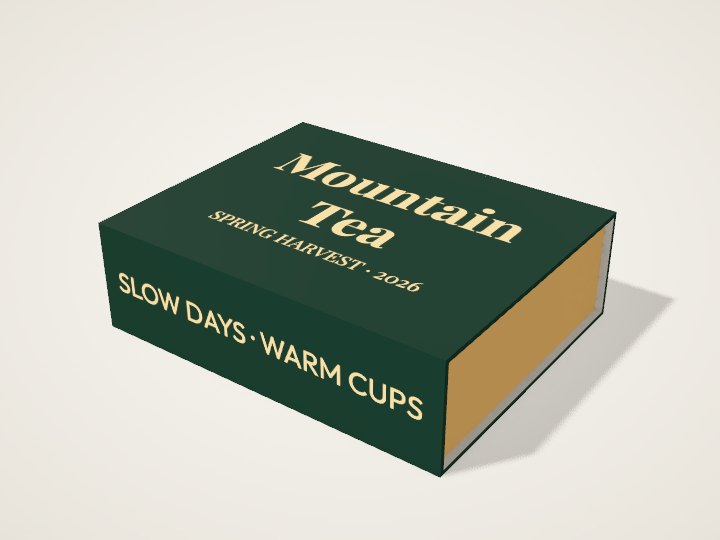
Lift-off lid box
Full-color print on the lid top and sides — for desserts, tea and favors.
Flip-lid gift box
A book-style rigid box: the lid, the front flap and the inside of the lid are all customizable, with a choice of tray colors.
Natural slate, and your next product
UV printing straight onto natural slate is already in use — no background, the design sits right on the stone. More box shapes, glassware and materials: hand the product documents to the platform, AI drafts the products, and you check them before they go live.
How to add themDrop in your documents, AI drafts
Console → Import: Word, PDF, images and Photoshop files all work. AI finds every item, its color variants and its customizable areas, crops the photos and drafts the products; you check each one and put it live.
Same method, new item: one form
Another size, another glass, another box: New product or Duplicate, fill in the name, sizes and parameters, and save. It’s live — no code.
A brand-new process: we build it
New unfolded geometry, no-go zones, 3D model and production files, built from your dielines and process constraints. Once it’s in, it works like every product above.
05FOR YOUR CUSTOMERS
Three ways to design, switch any time
Customers who can’t design talk to the assistant, customers with ideas click what they want changed, and customers who can design just get to work. Every step can be undone; designs save automatically to the account.
One sentence, a complete design
“My best friend’s birthday, she loves cats and coffee” — the assistant picks the size and items, writes every side and draws the art. Attach a photo to draw from, or a logo to print as is.
Click what you want changed
Select one element and talk to it, or get 3 versions side by side first; select several to change them together, like matching fonts and colors.
Edit by hand
Drag, scale and rotate on the unfolded panels, double-click to edit text; select something and its common settings appear above the canvas. Works on phones too.
Customers can upload their own files
Images become editable elements too
- Split into layersClick to select an object automatically, or pick by color with the magic wand
- Remove backgroundCut out the subject in one click; white backgrounds drop away automatically
- Vectorize and recolorSplit by color so every color can be changed on its own
- Text in images becomes editableRecognizes text in a picture and turns it into editable text
- Text always stays its own layerThe AI never paints letters, so all text can be edited directly
Small conveniences
- Drop it where it goesDrop a file on a side and it lands there; drop it on an image to replace it
- AI promo imagePut the finished product in a real scene for a product photo, saved with the design
- 3D as you editSlide out the tray, open the lid, pour a beer; pop the 3D out to float over the canvas
- MultilingualDescribe what you want in your own language — the assistant replies in it, and the interface and job sheets follow
06STANDARDS
The factory sets the standards
The product’s own constraints are hard rules customers can’t get around. Print and engraving numbers belong to each product: hand your standards file to the assistant, it reads every item with the quote and sets anything marked “not accepted” to Block; confirm and save, and customers are checked against it from their next action.
Hard rules (from the product itself, must pass)
- No-go zonesNo text, photos or main art on the glue tab, the handle and similar areas
- FoldsText can’t cross a fold; main images crossing one get a warning
- Cut linesText can’t go beyond the cut line or the engraving area
- Item constraintsOnly colors the factory stocks; unlisted items can’t be chosen
- It has to fitItems must fit flat inside the box before an order can be placed
Process numbers (set per product, gift box shown)
| Item | Default | Factory can set |
|---|---|---|
| Bleed | 2 mm | Value |
| Text safe margin | 3 mm | Warn Block |
| Minimum text height | 2.1 mm | Warn Block |
| Text contrast | 3 : 1 | Warn Block |
| Thinnest line | 0.2 mm | Warn Block |
07PRODUCTION FILES
Every order arrives ready to run
When the customer clicks Send to factory, the platform re-checks the design against your current standards and only then creates the order. It appears in the console at once, with the production PDF, print file and packing list attached.
Production PDF
Artwork with the dieline on top, dimension drawing and scale bar below
Print / engraving file
The whole unfolded sheet, bleed on every edge
Proof
Cut lines, folds, no-go zones and side names marked
Render
The finished product as the customer saw it
Packing list
Item photos, quantities, colors and size sources
Standards used
The numbers in force at the time, plus other process notes
08FACTORY CONSOLE
Orders, products and standards in one place
Orders, products, imports, production standards and users. Every change here takes effect in the customer’s editor immediately.
New orders just appear
New / In production / Shipped; notes, archive, search, packing-list CSV export.
List your items
Names, sizes, color variants, photos, availability; a health check shows what’s missing and the product assistant helps fill it in.
Documents become products
Drop in Word, PDF or PSD; AI crops the photos, traces the custom areas and drafts the records for you to check.
Hand over the file
Bleed, safe margin, minimum text height… read per product, each with its quote; any change can be undone.
Accounts and credits
See who signed up, adjust credits, make admins, disable accounts, open or close sign-up.
09DESIGN MARKET
Let customers bring you the next order
Customers publish designs they’re proud of; others start their own from one in a single click and change it. Each person who uses it earns the author credits, and each order placed with it earns more. Good designs spread themselves, and the factory gets more orders that are ready to produce.
One click to the Market
An AI promo photo or a 3D shot as the cover, a title and a line about it
Others start from it
They get their own copy to change freely; the original stays as it is
The author earns credits
+2 for each new person who uses it, +10 for each order
One more order
Through the same checks, with the same complete files
10ACCOUNTS & CREDITS
AI is billed per use, in credits
Customers sign up themselves and their designs follow the account. Each AI action costs a few credits; a new account gets 30, enough for a complete design. Credits can be topped up, or earned back by publishing designs.
What each step costs (defaults)
| Action | Credits | Notes |
|---|---|---|
| One message to the assistant | 1 | A whole design or a single change, either counts as one |
| Get 3 versions | 2 | Three thumbnails drawn in parallel |
| Gift suggestions | 1 | Checked against the box’s inner dimensions |
| One AI image | 3 | Illustration, sticker, pattern or photo style |
| AI promo image | 5 | The finished product in a real scene |
| Failure | refunded | If the AI doesn’t deliver, credits come back |
The credits page customers see
11FAQ
What factories ask most
Which products are supported?
In use today: printed sleeve gift boxes, lift-off lid and flip-lid boxes, laser-engraved glassware, and UV-printed natural slate. New items made the same way go live from a form in the console; brand-new processes are built by us.
How long does it take to add our products?
Drop your product documents (Word, PDF, images, Photoshop files) into Import: AI crops the photos, traces the custom areas and drafts the products, and after your check they can go live the same day. A brand-new process (new unfolded geometry, no-go zones, 3D model, production files) usually takes a few days.
Who decides the production standards?
The factory. Hand your standards file to the assistant: it reads bleed, safe margin, minimum text height, contrast and thinnest line, each with its quote, and sets anything “not accepted” to Block. Confirm and save, and every customer is checked against it immediately. Anything the file doesn’t mention stays as it is.
How do you make sure customer designs can be made?
Hard rules (no-go zones, folds, cut lines, item constraints, fit) block sending; on send the server re-checks against the current standards and only then creates the order, and the job sheet records which standards were used. Process notes the platform can’t check are copied onto the job sheet for the factory.
What do the production files look like?
Each order has a 1:1 production PDF (text outlined, cut and fold lines as spot colors on their own layers, every element editable), plus a 300 dpi print or engraving file, a proof, a 3D render and a packing list (exportable as CSV).
How are credits priced?
A new account gets 30 credits, AI steps cost 1 to 5, and published designs earn credits back when others use them. Prices, welcome credits and rewards can all be adjusted; top-ups follow how your factory wants to operate.
Where is the data?
The platform is a self-contained service: designs, orders and images live on the server, and it can run on the factory’s own machine or a cloud host. The data belongs to the factory.
How long does the AI take?
Text and layout for a full design take 10 to 20 seconds; each illustration about 30 seconds, drawn in parallel. Customers keep editing while they wait and can see the queue.
From idea to in hand
Open the editor and say who it’s for and the occasion; click to change what you don’t like, and send it to the factory when it’s right.